
I’M SAFE Support
How can we help?
Find a clear answer. Get back to your day.
Quick answers
Prefer to see the steps?
Short guides with full captions. Pause and follow at your own pace.
01 / Start here
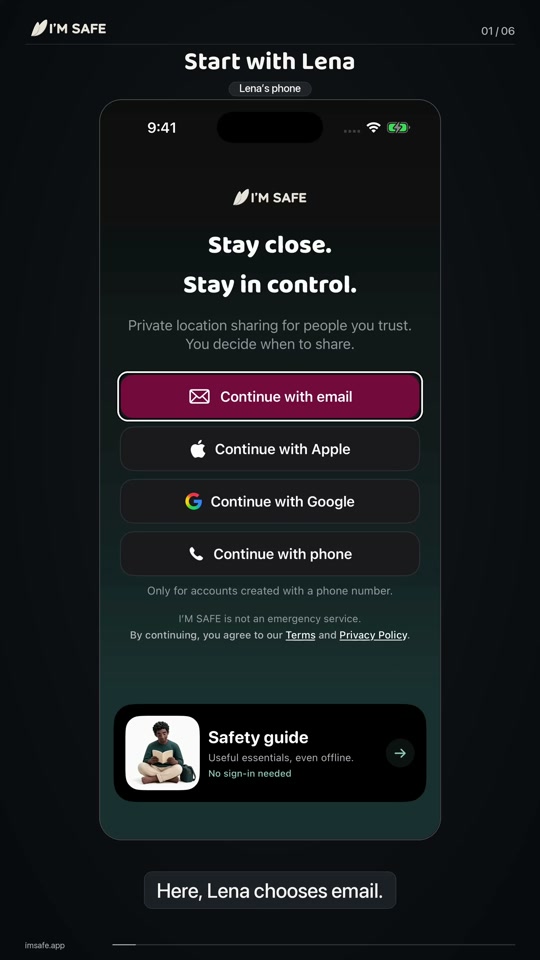
Get connected
Create an account, invite someone you trust, and see each other in your Bubble.
02 / Your people
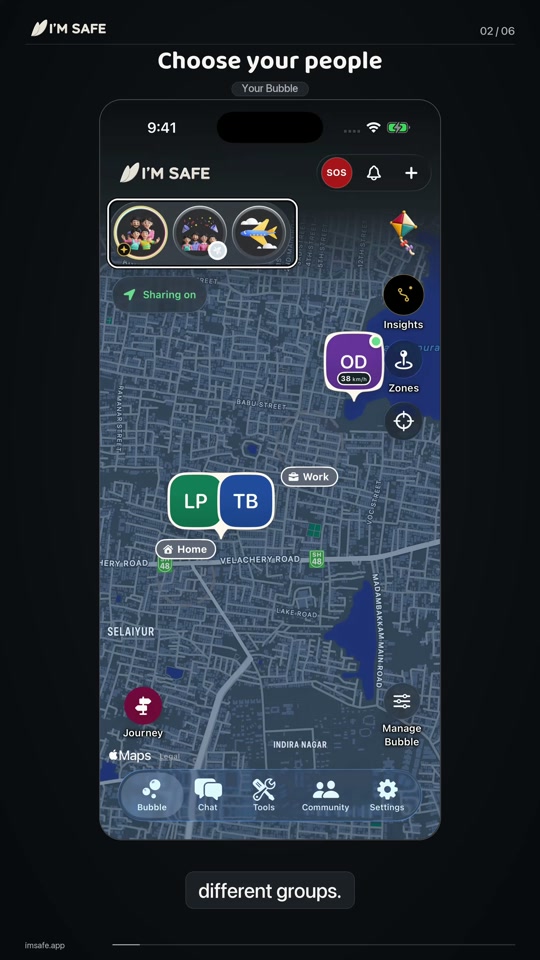
Your Bubble
Find your people, switch groups and choose when you share.
App and Bubble
Is the app available on iPhone and Android?
Yes. The I'M SAFE app is available on both iPhone (App Store) and Android (Google Play).
Download the free appCan I use the app without an SOS Tag?
Yes. The I'M SAFE app can be used on its own for features that do not depend on a paired SOS Tag.
What is Bubble?
A Bubble is an invite-only group for family or friends. Each member chooses when to share. Sharing is separate for each Bubble; phone permission alone does not turn it on.
Watch: Your Bubble0:52About the appWhat is Fake Call? (Android only)
Fake Call plays a simulated incoming call so you have a reason to step away. Nobody is actually calling and it does not alert your Bubble. Fake Call is Android only.
About the appWhat is Vault? (Plus · iPhone and Android)
Vault keeps your selected notes, photos, files and deliberate foreground recordings encrypted on iPhone and Android, behind device authentication and separate from your Bubble. Optional encrypted backup and recovery are available; keep your Recovery Key safe. Eligible Plus access lets you add records. Existing records remain available if Plus ends. Copies you export leave Vault protection.
Watch: Your tools0:56About the appCan I see weather on my map?
Weather near you, right on your Bubble map. It is one of the things people check every day, so it is included for everyone and sits right at the front: one tap on the weather pill shows the hours ahead for your area. Weather asks for your permission once and only ever sends an approximate area, never an exact position. You can turn weather off in Settings > Permissions or the weather panel.
Watch: Your tools0:56Weather near youWhat happens when a location link opens in the app?
When the original supported link opens in the installed I’M SAFE app, it appears as a temporary Bubble for the person sharing. It lasts for that link’s lifetime, does not join their private groups and shows no history or other people. App opening depends on the device’s supported-link settings. A browser download button does not transfer the link automatically: open the original link again after installing.
See screens and detailsCan I use an iPad or Android tablet?
Yes, as a viewing companion. Sign into the same account as your carried phone to see Bubbles, maps, Chat and settings in a larger layout. Your phone supplies the account’s location. Start SOS, Journeys and new live-location links on the phone. A tablet can view and stop an existing link, but cannot create one. Vault and Tag controls stay on the phone. iPad needs iPadOS16.4 or later; Android tablet availability depends on supported hardware and its store.
See screens and detailsHow do I pair a watch, and do its complication or tile send SOS?
Install I’M SAFE on your paired Apple Watch or supported Wear OS watch, sign into the phone app, then open watch setup on the phone and follow the pairing steps. Keep the Apple Watch app open and reachable during pairing; Wear OS uses its companion listener. Keep the phone link working. The complication or tile opens the SOS screen and sends nothing by itself. Hold SOS to begin its five-second countdown, with a cancel option. A Journey starts on the phone; the watch can view or end it and extend a timed Journey. Apple Watch needs watchOS10 or later; Wear OS needs Android11/API30 or later.
See screens and detailsHow do People widgets and Journey Live Activities work?
After setting up a Bubble, add the I’M SAFE People widget through your phone’s home-screen widget picker. It shows people and update times. Refresh depends on the operating system, connection and app state. Cached information may remain while offline, but that is not continued live sharing. People widgets do not start SOS. Enable Live Activities on iPhone for Journey progress; compatible iPhones also use Dynamic Island. Android uses its own Journey notification.
See screens and detailsWhat do old, offline and approximate locations mean?
Read the update time before treating a marker as current. Connectivity, background permissions, battery and phone settings affect new updates. Last-known information is not proof of someone’s present position. Approximate or rough information has lower accuracy; it should not be read as an exact position. Being offline does not mean the app continues sending live updates.
Watch: Your Bubble0:52See screens and detailsWhat are Nudge and Ring?
Nudge requests a fresh location from a Bubble member. Their sharing and privacy choices still apply, and it does not guarantee a response or new position. Ring is an optional request that depends on the recipient enabling it, their permissions and connection. It is off by default and respects blocking. Neither is SOS or a substitute for contacting someone directly in an emergency.
See screens and detailsDoes opening SOS send an alert, and what does acceptance mean?
Opening the SOS screen lets you review selected eligible Bubbles and recording options. Start SOS begins a five-second cancellation countdown. The app then attempts to send; it shows active only after server acceptance. Acceptance does not prove a contact received, read or can respond. I’M SAFE does not contact emergency services.
Watch: Know your SOS0:49See screens and detailsWhat does Mute Bubble silence, and which alerts remain?
Open Manage Bubble to mute one Bubble. Mute silences ordinary Chat, mentions, Zone events, driving/speed and Journey notifications while retaining Activity. SOS, Ring, Nudge, help replies and safety alerts for prolonged stops, missing Journey location and low battery remain enabled. You can unmute the Bubble at any time.
Watch: Your Bubble0:52See screens and detailsWhere can I download the app?
The I'M SAFE app is available on the Apple App Store and Google Play using the links below.
Watch: Get connected1:01Download the free appWhat should I do if a feature is not working?
First, check that your app is updated to the latest version and that required permissions are granted. If the issue persists, contact support with your device model, operating system version, app version and a description of the problem.
Contact supportPersonal Alarms
Do Personal Alarms need the app?
No. Personal Alarms are standalone devices and do not require the I'M SAFE app.
Do they require Bluetooth or a smartphone?
No. Personal Alarms do not require Bluetooth or a smartphone. They operate on their own.
Do Personal Alarms notify trusted contacts?
No. Personal Alarms produce a loud local siren to draw attention. They do not automatically notify trusted contacts.
How do I activate the alarm?
Activation follows the instructions supplied with your specific product. Read the included product instructions and test the device on receipt.
Which colour options are available?
Available colours are shown as live variants on each Personal Alarm product page. Availability may change over time.
Shop Personal AlarmsDo Personal Alarms contact emergency services?
No. Personal Alarms do not contact emergency services. In an emergency, always call your local emergency number directly.
Orders and payment
Can I change an order after payment?
Contact support as soon as possible if you need to change an order. Changes cannot always be guaranteed once an order has been placed.
Contact supportCan organisations place bulk orders?
Yes. Colleges, schools, workplaces, NGOs, event organisers, community programmes and institutional buyers can submit a bulk-order enquiry.
Bulk ordersIs there a minimum quantity?
Minimum quantities are confirmed after we review your enquiry, based on the products and use case you describe.
Bulk ordersAre bulk prices shown online?
Bulk pricing is not published on the website. Pricing is shared after your enquiry is reviewed.
Bulk ordersCan we request product guidance?
Yes. Describe your use case in the bulk-order enquiry form and we will suggest suitable products.
Bulk ordersCan colours be selected for bulk orders?
Colour selection for bulk orders depends on the products chosen and current stock. Mention your preferences in your enquiry.
Bulk ordersHow do I order devices outside India?
Send a bulk enquiry through the Shop page. International individual retail checkout is not offered. We confirm quantities, availability, shipping and an INR quote before you decide. Orders are dispatched from India; destination duties and taxes are your responsibility.
Make a bulk enquiryWhich products, colours and payment methods are available?
Tell us your required devices, quantities and preferred colours in your bulk enquiry. Support confirms stock, payment arrangements and the final quote before an order is accepted. App availability does not establish international device availability.
Contact supportShipping and delivery
How can I track my order?
Where tracking is available, details are shared by email after dispatch. Contact support with your order number if you need help.
Contact supportWhat should I do if my order is delayed?
Contact support with your order number and delivery address. We will look into the status of your shipment.
Contact supportCan I order devices from outside India?
International physical device orders are by bulk enquiry only. Individual retail checkout is not available for international orders. Submit a bulk enquiry for a quote; orders are dispatched from India and estimated delivery is 7-30 business days.
Bulk enquiries ShippingWhere are International orders dispatched from?
International orders are fulfilled and dispatched from India.
What currency are international quotes in?
Bulk enquiry quotes are provided in INR. Your bank or payment provider may apply its own exchange rate or fees.
Who is responsible for import duties on international orders?
The customer is responsible for any import duties, taxes or customs charges imposed by the destination country. These are not included in the quoted price.
Is Cash on Delivery available internationally?
No. All orders are prepaid. Cash on Delivery (COD) and Partial COD are not available.
Returns, refunds and warranty
Is there a warranty?
Every I’M SAFE device includes a one-year limited warranty from delivery for faults in materials or workmanship under normal, intended use. It does not replace rights that cannot lawfully be excluded under consumer law.
WarrantyHow do I report a defect?
Email support with your order number, the product name, a description of the issue and any relevant photos or videos.
Contact supportWho pays return shipping?
If a fault claim is accepted and the product must be returned, we provide return instructions and cover reasonable return-shipping costs where required. Contact support before returning anything.
Contact supportCan I return an International order?
We do not generally accept returns for change of mind. If your item is faulty, damaged, incorrectly supplied or otherwise covered by applicable consumer law, contact support@imsafe.app before returning it.
Returns & refundsWhat should I do if my product arrives damaged or faulty?
Contact support@imsafe.app with your order number and details of the issue. We may request photographs, video or other information so we can assess the claim and provide an appropriate remedy.
Contact supportTroubleshooting
How do I contact support?
Email support@imsafe.app or use the contact page. We will respond as soon as possible.
Contact supportWhat information should I include for device support?
Include your order number, the product name, a description of the issue and any photos or videos that help show the problem.
What information should I include for app support?
Include your device model, operating system version, app version, the feature affected and steps to reproduce the issue.
Does I'M SAFE offer WhatsApp support?
WhatsApp support is not listed at this time. Please use email or the contact page.
Contact supportWhat should I do before relying on an SOS Tag?
Install the I’M SAFE app, grant required permissions and follow the pairing steps. Check Bluetooth, battery and connection. Agree any SOS test with your chosen recipients beforehand; an alert does not guarantee a response.
Does any device guarantee protection?
No device or app can guarantee protection or replace emergency services. In an emergency, always call your local emergency number.
Choosing a product
What is the difference between a Personal Alarm and an SOS Tag?
Personal Alarms are standalone devices that sound a loud local siren when activated - they do not need a phone, app or Bluetooth. SOS Tags are Bluetooth safety tags that pair with the I'M SAFE app on a compatible smartphone to trigger in-app actions.
Compare productsWhich products work without a smartphone?
Personal Alarms work without a smartphone. They are standalone devices that produce a local siren when activated.
Shop Personal AlarmsWhich products require the I'M SAFE app?
SOS Tags require the I'M SAFE app on a compatible smartphone with Bluetooth and the relevant permissions enabled.
Shop SOS TagsHow do I compare the available products?
Use the product comparison page to see features side by side, or browse categories on the shop to view current options.
Compare products Shop allTalk to our team
Still need a hand?
Tell us what’s happening. We’ll help you find the next step.
I’M SAFE support is not an emergency response service.